01 / SMALL BUSINESS
⌘
Less busywork. More business.
Build the request tracker, approval app, or operational tool your business needs. Choose Backify hosting and focus on the workflow, not assembling infrastructure.
Turn everyday business problems into applications your team can use. Backify brings managed app capabilities, deployment, and control to your AI coding workflow—from your first internal tool to software across the enterprise.
Paid plans. Starter: €19 or $19/month before tax. Your first Starter purchase includes a 30-day money-back guarantee. See pricing and guarantee terms.
Whether you are replacing a spreadsheet, connecting a department, or enabling teams across an enterprise, Backify gives your software a repeatable path from idea to production.
Build the request tracker, approval app, or operational tool your business needs. Choose Backify hosting and focus on the workflow, not assembling infrastructure.
Replace scattered workflows with apps your departments can own. Reuse managed capabilities, organize workspaces, and make publishing responsibilities clear as your team grows.
Give builders a governed route to production. Deploy application resources in your Azure subscription with scoped access, release approvals, and recorded deployment history.
Use your preferred AI assistant to build the product. Bring repository-based code into Backify’s supported workflows for managed capabilities, previews, and deployment.
Use your preferred tool to create code and connect your project through Backify’s supported workflows.
Get the speed of AI-assisted development without losing sight of who owns the app. Keep source in GitHub, choose Backify hosting or customer Azure, and manage access and releases in one place.
Start with Backify hosting or deploy application resources into your own Azure subscription to align with your organization’s cloud requirements.
Define who can publish, which checks must pass, and when an approval is required.
Keep deployment activity, decisions, revisions, health, and rollback history in view.
Use permissioned interfaces and federated workload identity instead of handing agents long-lived cloud credentials.
Give the people building software and the people responsible for it a shared path to launch.
Go from generated code to a working preview without rebuilding identity, data, deployment, and environment plumbing for each app.
Replace one-off cloud access and release scripts with a consistent, reviewable path your organization can govern.
Connect the work you already do
Bring communication, customer records, payments, and accounting into the apps you build. Backify’s integration catalog provides defined operations your team can review and connect to your workflows.

Bring Outlook mail, calendar events, and contacts into your business workflows.

Work with Gmail, Calendar, Sheets, Drive, and Docs through service-specific connections.

Connect channel conversations, read permitted messages, and send updates from your app.

Track issues, pull requests, and workflow runs alongside your application’s work.

Connect customer records, invoices, Checkout, and subscription status to your workflows.

Keep contacts, companies, and deals connected to your team’s processes.

Build workflows around accounts, contacts, opportunities, and reviewed record queries.

Find shared content, query data sources, and create or update pages.

Connect customer records and invoice workflows for your business.
Bring customer and invoice records into your accounting workflows.

Work with customer records, invoices, and company-specific accounting data.

Build workflows around contacts and invoices in your authorized organization.
Approve specific operations and keep credentials on the server. Each application connects with its own reviewed permissions.
Bring your own API through a reviewed OpenAPI contract, or use approved webhooks to connect existing workflows.
Featured catalog providers. Provider accounts, setup, and permission approval are required. Available operations depend on the connection and provider plan; live workflows must be verified before launch.
A practical first step
Start with a bounded business problem and someone who can build with an AI coding tool. Backify connects that work to the services and hosting the application needs.
Agree on the users, the information they need, and the decision or task you want to improve. Pick one outcome you can evaluate.
Connect a GitHub repository and follow Backify's setup guidance. Your builder creates the app using managed capabilities.
Test a working preview, refine the workflow, and check access before publishing. Compare the result with how you work today.
Paid plans. Starter: €19 or $19/month before tax. Your first Starter purchase includes a 30-day money-back guarantee. See pricing and guarantee terms.
A buying decision you can explain
Your application source stays in GitHub. Your team owns the business logic, reviews AI-generated changes, and remains responsible for application access and support.
Understand the platform →Choose Backify hosting to begin without your own Azure subscription. Business and Enterprise also support customer Azure; your Azure bill and Backify platform fees are separate.
Compare hosting options →Start small. Buy with clarity.
Choose a paid plan that fits your builders, apps, and hosting requirements. Viewers, approvers, auditors, and application end users do not need paid seats.
Starter / your first app
€19 or $19 / month, before tax
Paid subscription, not a free trial. An app that reaches an allowance pauses until next month or an upgrade.
Team / build together
€39 or $39 / builder / month, before tax
Business & Enterprise / scale with control
Evaluate customer Azure hosting, release approvals, region policies, and compliance review features. Availability and limits depend on your plan.
Compare governance and hosting →Talk to sales →Before you decide
Backify provides managed app capabilities and the path from source code to a running application. Your builder uses an AI coding tool to create the application. Backify is not a prompt-only, no-code editor.
You need a builder who can work with GitHub, an AI coding environment, and application code. You do not need your own Azure subscription for Backify hosting. Customer Azure is available on Business and Enterprise and requires administrator involvement.
Yes. Start with one workflow on paid Starter at €19 or $19 per month before tax. There is no free plan or free trial. Your first Starter purchase has a 30-day money-back guarantee; the pricing page explains eligibility and refund terms.
Starter includes one builder, one Backify-hosted app, local development, and monthly capability allowances. Starter has hard caps. Team and Business bill usage above allowances separately; extra builders and apps follow your plan. Customer Azure costs are separate. Use the pricing calculator to estimate your setup.
Your source stays in GitHub. Backify manages platform capabilities and deployment operations, while your team remains responsible for the application code, business rules, authorization, and user support. Customer Azure does not move the Backify control plane into your tenant. Review the security and deployment pages for the boundaries.
Your data. Your hosting region.
Host your application and its regional data resources in a supported region you choose for your deployment target. Align your hosting location with your users and your organization’s requirements.
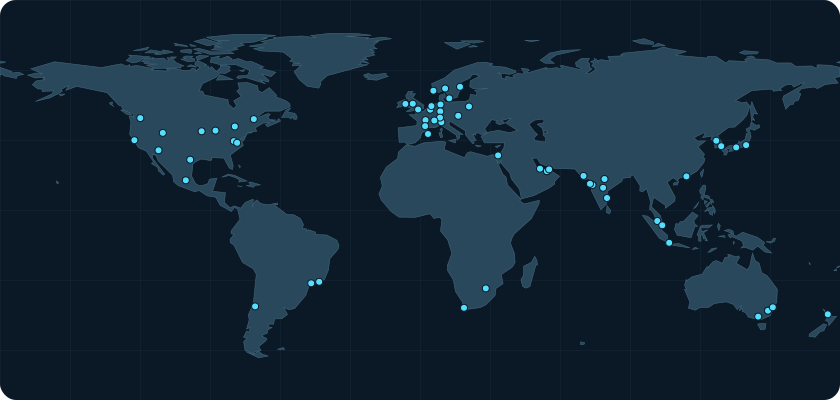
Application hosting, not a blanket residency guarantee. Backify control-plane data is a separate boundary and should be reviewed independently.
Explore regional deploymentStart with one workflow worth improving. Create your account to connect an app, or explore pricing to plan the right setup for your team.
Start building